CASE STUDY
AI Agent
Customer Support & Internal Automation
Designing conversational agents for enterprise B2B clients – from defining agent logic and conversation
flows to building the interfaces that humans use to manage, monitor, and trust AI systems.
Role
Senior Product Designer
Context
B2B / Enterprise
Tools
Figma, Miro, Claude, GPT-4
Focus
Agent UX, Admin UI, Flows
Outcome
↓ 35%
reduction in support tickets escalated to human agents after agent rollout
↑ 78%
user satisfaction score on agent-handled interactions after second design iteration
↓ 50%
onboarding time for ops teams managing the agent dashboard
↑ 85%
internal adoption rate among support leads within the first month
Challenges
As a Senior Product Designer, my primary responsibility was to define what “good design” means when the product is not a screen – it’s a conversation. I was brought in to design the end-to-end experience of AI agents deployed for enterprise clients: the agent’s conversational logic, the customer-facing chat interface, and the internal tools that allowed non-technical teams to manage, monitor, and adjust agent behavior.
The work spanned two agent types – a customer support agent handling inbound queries, and an internal automation agent streamlining operational workflows – each with distinct user needs, trust requirements, and failure scenarios.
- Designing conversation, not screens:
AI agents don’t follow linear flows – they respond to intent. Traditional UX methods (user flows, wireframes) had to be replaced with new tools: conversation maps, intent trees, and failure state scenarios. - Building trust in autonomous systems:
Enterprise users needed to understand what the agent was doing and why – and to feel confident overriding it. Designing for transparency and human-in-the-loop control was central. - Admin interfaces for non-technical users:
The people managing agents – customer support leads, ops teams – were not developers. They needed interfaces to monitor, adjust, and train agents without writing a single prompt. - Graceful failure design:
When an agent doesn’t know the answer or misunderstands intent, the experience must not break. Designing fallback states, escalation paths, and human handover flows was a critical part of the work.
Objectives
- Define agent conversation logic:
Map all key intents, edge cases, and escalation triggers into a structured conversation framework usable by both design and engineering. - Make AI behavior transparent:
Design interfaces that surface agent reasoning, confidence, and limitations – so users always know when they’re talking to AI and what it can do. - Empower non-technical admins:
Create a management dashboard that allows ops and support leads to oversee, tune, and intervene in agent behavior – without engineering involvement. - Design reliable human handover:
Ensure that every agent failure – misunderstood intent, out-of-scope query, low confidence – results in a smooth, non-disruptive transition to a human agent. - Increase user trust and adoption:
Reduce hesitation toward AI-handled interactions through clear communication, consistent behavior, and visible accountability mechanisms. - Enable iterative improvement:
Build feedback loops into both the agent UI and admin tooling – so the system could be continuously improved based on real interaction data.
DESIGN PROCESS
RESEARCH
Competitor analysis
Shadowing
STRATEGY
Intent mapping
Conversation Design
IDEATION
UI Prototyping
VALIDATION
Usability Testing
RESEARCH
I started by shadowing customer support teams to understand what queries they handled daily, how they escalated issues, and where they felt the system slowed them down. Alongside that, I ran stakeholder workshops to align on what “success” meant for an AI agent – a different conversation for an ops team versus a CX lead.
I mapped all incoming query types into an intent taxonomy – the foundation for both agent logic and fallback design. This was a hybrid of traditional UX research and a new layer: understanding how language models interpret and misinterpret input.
Key insight: users didn’t fear the agent making mistakes – they feared not knowing when it had. Transparency became the core design principle.
STRATEGY
From raw input to a structured design language
Before any interface work began, I needed a clear model of how the agent should think and behave. The strategy phase translated research data – interviews, support tickets, and stakeholder workshops – into two foundational tools: an intent taxonomy and a conversation design framework. These became the shared reference point for everyone on the project: designers, product managers, and the engineering team building the underlying model.
ers. Novice users could access step-by-step guidance, while advanced users had the option to bypass these tutorials for a quicker experience.
Deliverable 01: Taxonomy
A structured map of every query type the agent would encounter – organized by category, agent type, and handling complexity.
Deliverable 02: Conversation Design Framework
A set of rules and patterns governing how the agent communicates: tone, escalation logic, uncertainty handling, and fallback behavior.
Intent mapping
I started by consolidating data from three sources: user interviews (what people said they needed), existing support tickets (what they actually asked), and stakeholder workshops (what the business needed the agent to handle). Together, these revealed a much wider spread of intent types than the initial brief had assumed – including a significant volume of edge cases and emotionally charged queries that the agent had to handle with particular care.
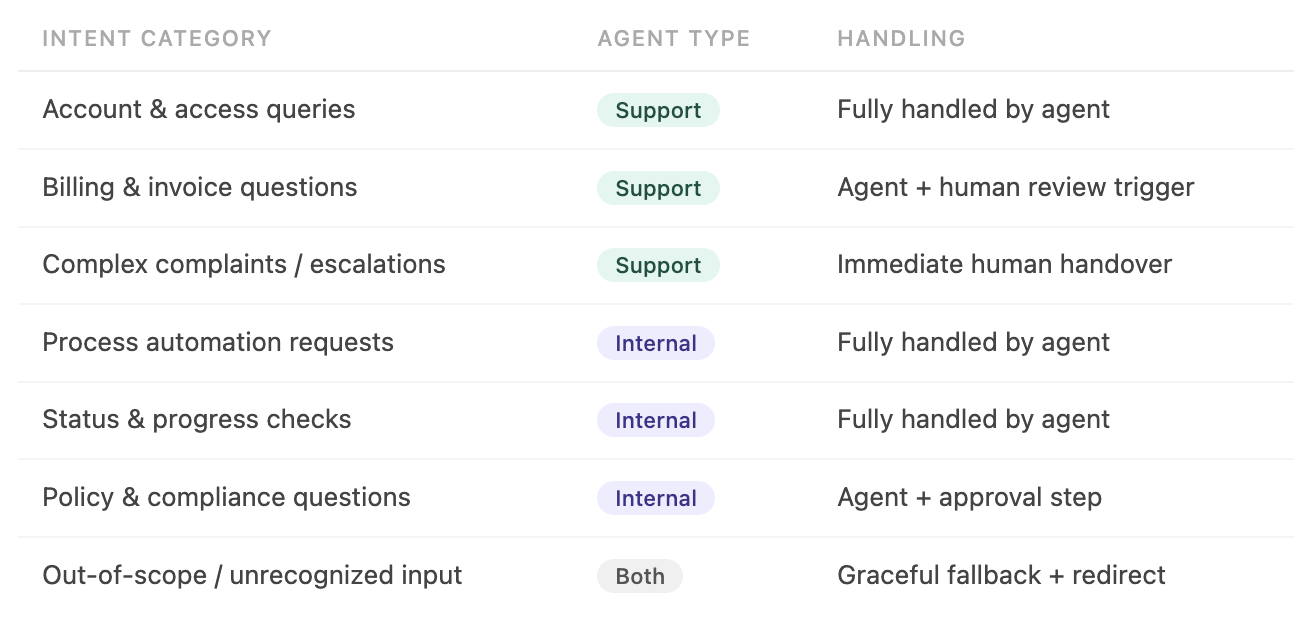
The taxonomy wasn’t just a UX artifact – it became the specification for the engineering team building the model’s prompt structure. Every intent category mapped directly to a defined agent behavior.
Conversational design
With intents defined, I moved to designing how the agent would actually communicate. This meant establishing rules that went beyond scripting individual responses – it was about creating a consistent, trustworthy voice that could handle everything from a simple status check to a frustrated customer complaint.
The conversation design framework covered four areas: agent tone and personality, uncertainty and confidence signaling, escalation triggers and handover language, and fallback patterns for out-of-scope input. Each was documented with annotated examples, not just principles – so the engineering team had concrete reference points, not abstract guidelines.
IDEATION
Building something to test - with AI in the loop:
With the conversation framework in place, I moved into ideation. The goal wasn’t to design the perfect solution upfront – it was to get something testable in front of both end users and admin teams as fast as possible, so feedback could shape the design early rather than late.This phase is where AI became an active part of my design process, not just a research aid.
Translating research into prompts
Rather than jumping straight to lo-fi wireframes, I used the intent taxonomy and conversation framework as the basis for structured prompts in Figma Make. Each prompt was built from real data – user needs, agent behaviors, and defined UI patterns – not generic descriptions. This meant the generated output was grounded in the actual design brief from the first iteration.
First-draft generation in Figma Make
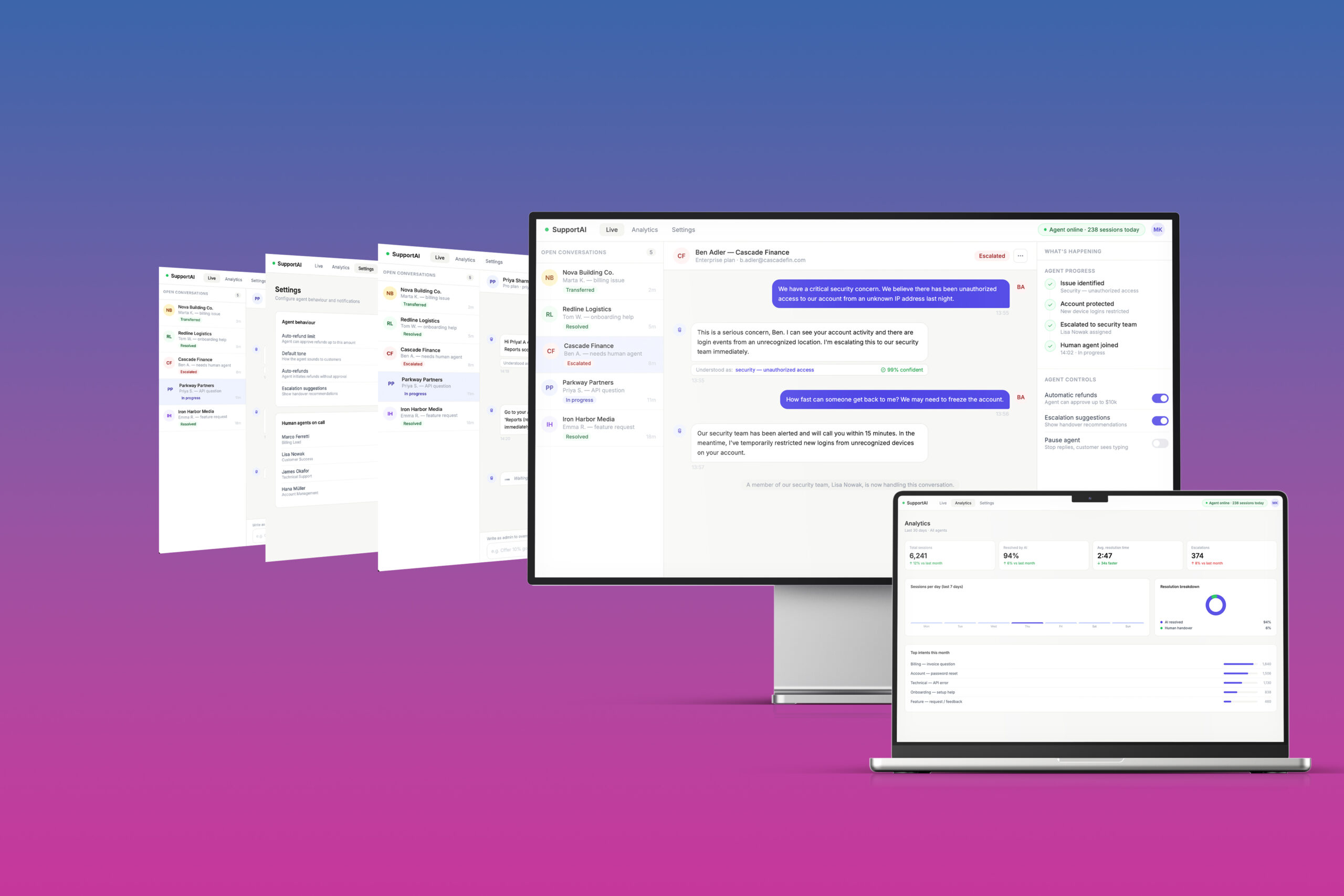
Figma Make produced an initial layout based on the prompt – not a finished design, but a concrete starting point. Having a visual artefact on day one of ideation changed the quality of the conversation with stakeholders and the engineering team. Instead of discussing abstract concepts, we were reacting to something real.
Refinement in Figma
Every AI-generated draft was then worked through in Figma – adjusting hierarchy, refining interaction states, and aligning with the design system. The AI output was never the final answer – it was a fast first hypothesis that I then interrogated and improved. This combination – AI speed, designer judgment – consistently produced better first drafts than either approach alone.
Separate prototypes for separate audiences
I built two distinct prototypes: the customer-facing chat interface for end users, and the agent management dashboard for internal admin and ops teams. Testing both audiences in the same session would have muddied the feedback – their mental models, success criteria, and pain points were fundamentally different.
The most useful thing AI did in this phase wasn’t generate beautiful screens – it eliminated the blank canvas problem. Starting from something concrete, even imperfect, made every design conversation sharper and faster.
VALIDATION
Moderated usability testing:
- With prototypes ready for both the customer-facing chat interface and the internal agent management dashboard, I ran moderated usability sessions with two separate audiences.
- Testing them together would have skewed the findings – their relationship to AI, their daily workflows, and what “success” meant for each were fundamentally different.
End users – mobile
Business customers using the support chat interface. Mixed age range, varying levels of comfort with AI-powered tools. Primary concern: getting their issue resolved quickly and reliably.
Internal teams – desktop
Customer support leads and operations staff managing the agent through the admin dashboard. High task awareness, motivated by efficiency. Primary concern: control and visibility over agent behavior.
End user findings:
- Overall satisfaction with the chat interface was higher than anticipated. Users found the experience clear and functional – the agent’s ability to handle common queries without handover was seen as genuinely useful, not a compromise. The more significant friction surfaced around trust, and it was closely tied to age and prior experience with AI tools.
The trust gap wasn’t a design failure — it reflected a real generational difference in AI familiarity. The response was to make confidence signals and human escalation paths more prominent in the UI, not to redesign the agent experience from scratch.
Internal team findings:
- Response from the internal teams testing the admin dashboard was strongly positive. For operations and support leads, the agent wasn’t just a product feature – it was a direct reduction in their daily workload. That context made them highly motivated testers, and their feedback was specific and actionable.
Internal teams were the most enthusiastic testing group across the project. The agent dashboard didn’t just test well – it validated the core premise: that making AI’s behavior visible and controllable is what turns hesitation into adoption.
What changed after testing:
- Testing didn’t surface fundamental problems – the core experience held up across both groups. The adjustments that followed were targeted: they addressed specific friction points that only became visible when real users engaged with the prototype under realistic conditions.
FINAL THOUGHTS
- Designing AI agents shifted my practice fundamentally. The deliverable is no longer a screen – it’s a system of decisions, fallbacks, and trust signals. The most important skill wasn’t visual design – it was knowing how to make an autonomous system feel accountable. This project made me a better designer precisely because it forced me to think beyond the interface.
Let’s make something amazing together!
HOME
ART
ABOUT
LEGAL NOTICE
Location
Germany, Munich Area
hello@aleksandramaslon.com